com|CONNECT overview
com|CONNECT is the Innovis e-commerce module for Microsoft Dynamics 365 Business Central. It connects Business Central with web shops and marketplaces (for example Magento or Shopware), transfers items including categories, attributes, and media to the sales channels, and retrieves online orders for further processing.
Note
The screenshots in this guide show the German user interface.
Main actions
The com|CONNECT Role Center groups the features into four areas:
| Area | Action | Opens |
|---|---|---|
| Info | Log | |
| Navigate | ||
| Sales | Customer Accounts | com|CONNECT customer account list |
| Online Orders | com|CONNECT Sales Order List | |
| Accounts (sales channels) | com|CONNECT account list | |
| Custom Options | com|CONNECT Custom Options list | |
| Items | Items | NAV Item List |
| Online Items | com|CONNECT Online Items | |
| Item Sales Groups | com|CONNECT Item Sales Group List | |
| Setup | Assisted Setup | com|CONNECT Assisted Setup |
| Reporting | ||
| Media Manager |
Sales channels
A sales channel represents a connected shop. In the com|CONNECT user interface, sales channels are called Accounts. Setting up a sales channel is a prerequisite for creating attributes, attribute sets, and categories, and for mapping them to the attributes and categories provided by the shop.
Concept
Because attributes, item types, and categories differ from shop to shop, com|CONNECT manages them independently of the shops.
- When a shop is set up for the first time, its elements are loaded and used as the initial values in com|CONNECT. These values are linked directly to the corresponding values of the shop.
- When more shops are added, the existing attributes, types, and categories in com|CONNECT are linked to those of the new shop. This happens when they are created or first used in an online item.
This separation lets you model shop-specific restrictions (for example, limiting the available item types to the category in use) and bind additional conditions to attributes in com|CONNECT (for example, a minimum length for descriptions).
Process overviews
Overall process
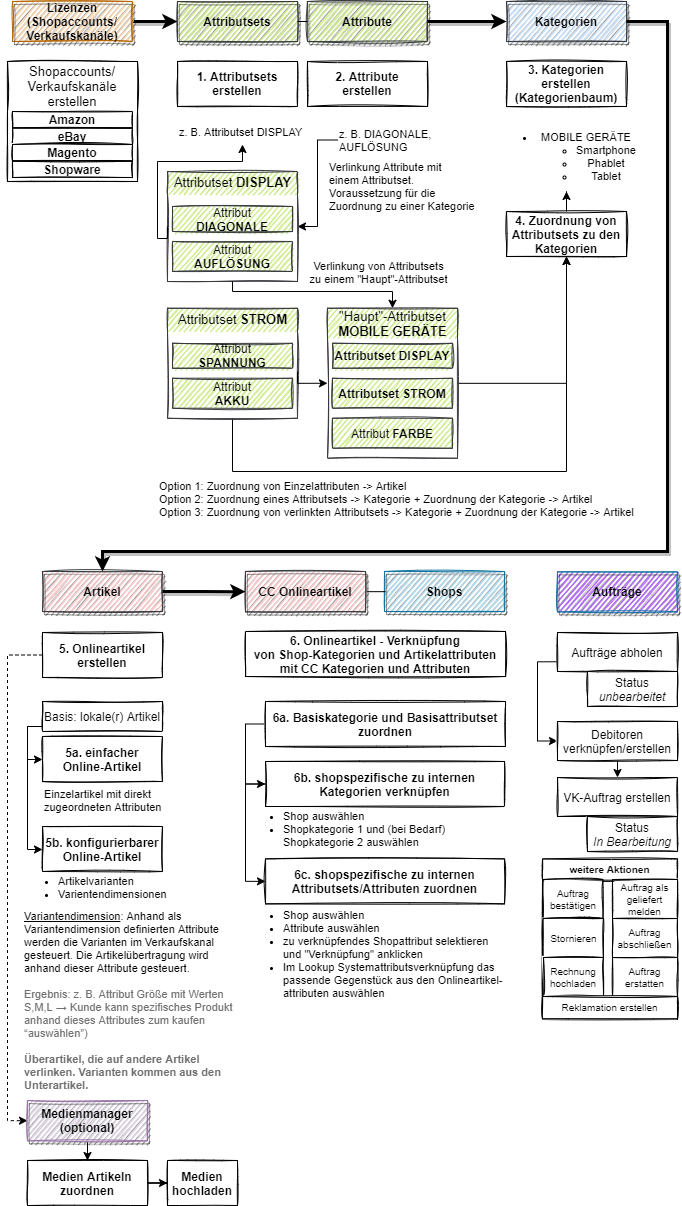
Online item setup (high-level)
Setup > com|CONNECT Assisted Setup > Online item setup
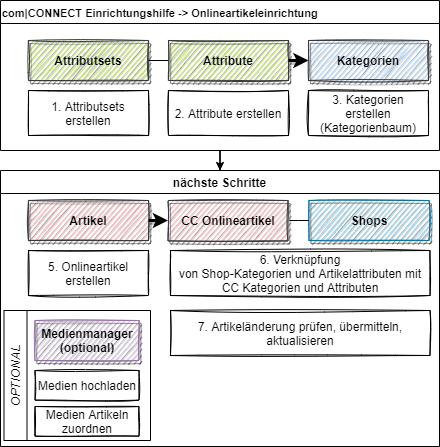
- Create attribute sets, attributes, and categories (category tree).
- Create online items.
- Link shop categories and shop attributes to the com|CONNECT categories and attributes.
- Check, transmit, and update item changes.
- Optional: Upload media in the Media Manager and assign it to the items.
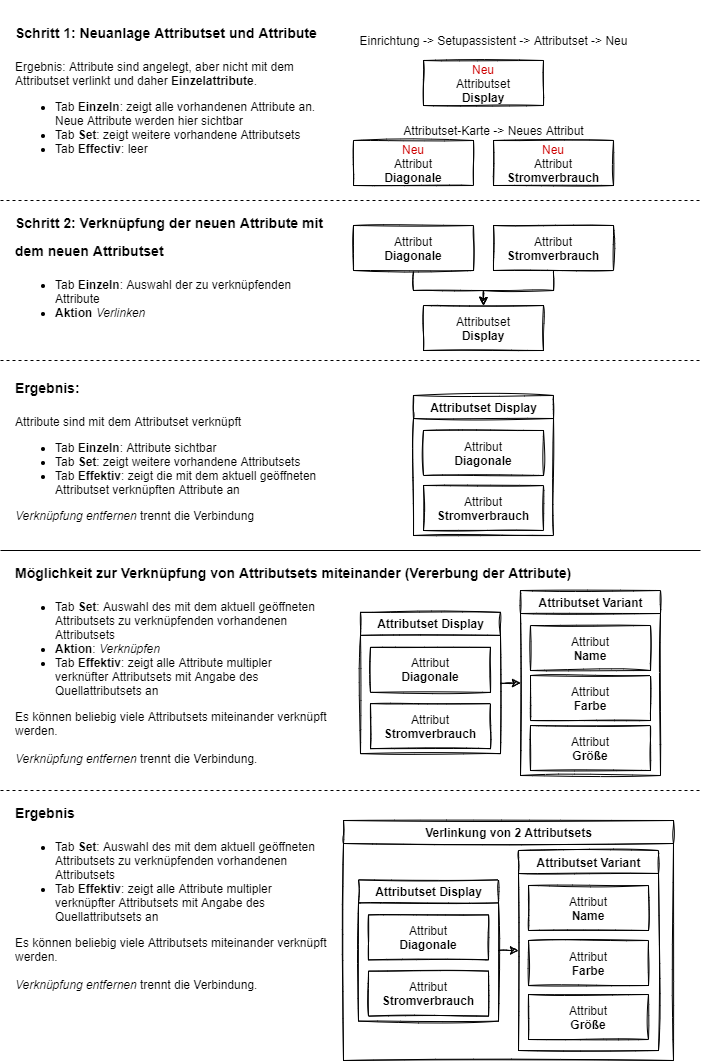
Linking attribute sets and attributes
Standard actions and fields
Most com|CONNECT lists provide the following standard actions:
- Search: Free text search.
- New: Creates a new entry.
- Edit List: Turns on edit mode for the page.
- Delete: Deletes the selected line.
- Open in Excel: Opens the list in Excel.
Commonly used standard fields:
- Code: Unique identifier. Lowercase letters are converted to uppercase automatically (mandatory).
- Name or Description: Free text.